Linkshare rotating banner
Showing posts with label driver. Show all posts

Sunday, September 30, 2012

To Compile ndiswrapper 1.58rc1 for Linux 3.5.4

ndiswrapper allows Linux users to use Windows drivers for PCI/USB network adapters on Linux. If you own a network device for which Linux support is still absent or premature, then you need to compile ndiswrapper yourself and install Windows driver for your network device. Fortunately, today's Linux supports most network devices out-of-box, so most distributions don't bother to include ndiswrapper. However, I am compiling ndiswrapper believing that Windows NDIS drivers would outperform native Linux drivers.


To my surprise, building the latest version of ndiswrapper (1.58rc1) did not require any patch. After compiling Linux 3.5.4, I downloaded the ndiswrapper source from the sourceforge site. I chose the testing version because I thought it would work better with Linux 3.5.x. I unpacked the source.


tar xzvf ndiswrapper-1.58rc1.tar.gz
cd ndiswrapper-1.58rc1


I typed the following commands to compile and install ndiswrapper.


KVERS=3.5.4 make uninstall
KVERS=3.5.4 make
KVERS=3.5.4 make install


Then, I generated modules.* files again.


depmod -e -m -F /boot/System.map-3.5.4 3.5.4


The following files were installed by ndiswrapper.


/lib/modules/3.5.4/misc/ndiswrapper.ko
/sbin/loadndisdriver
/usr/sbin/ndiswrapper
/usr/sbin/ndiswrapper-buginfo
/usr/share/man/man8/loadndisdriver.8
/usr/share/man/man8/ndiswrapper.8


Also read:


Monday, December 28, 2009

Linux: To Compile wpa_supplicant on Debian 3.1 Sarge

I was using good old Debian Linux 3.1 Sarge when I found out Sarge's wpasupplicant couldn't work well with ndiswrapper-supported Windows network drivers. So I set out to compile wpa_supplicant on my own. First, I installed the following development packages.


  • gcc-3.4
  • libssl0.9.7
  • make


Then, I downloaded the wpa_supplicant source (wpa_supplicant-0.6.9.tar.gz) from http://hostap.epitest.fi/wpa_supplicant. I unpacked the source and read the README files.


tar xzvf wpa_supplicant-0.6.9.tar.gz
cd wpa_supplicant-0.6.9/wpa_supplicant


I went into the wpa_supplicant subfolder and created .config to customize my build. The following is the contents of my .config:


CONFIG_WIRELESS_EXTENSION=y
CONFIG_DRIVER_HOSTAP=y
CONFIG_DRIVER_ATMEL=y
CONFIG_DRIVER_WEXT=y
CONFIG_DRIVER_RALINK=y
CONFIG_DRIVER_NDISWRAPPER=y
CONFIG_DRIVER_IPW=y
CONFIG_IEEE8021X_EAPOL=y
CONFIG_EAP_MD5=y
CONFIG_EAP_MSCHAPV2=y
CONFIG_EAP_TLS=y
CONFIG_EAP_PEAP=y
CONFIG_EAP_TTLS=y
CONFIG_EAP_GTC=y
CONFIG_EAP_OTP=y
CONFIG_EAP_SIM=y
CONFIG_EAP_AKA=y
CONFIG_EAP_PSK=y
CONFIG_EAP_SAKE=y
CONFIG_EAP_GPSK=y
CONFIG_EAP_PAX=y
CONFIG_EAP_LEAP=y
CONFIG_EAP_IKEV2=y
CONFIG_EAP=y
CONFIG_WPS=y


Then, I began compilation by running make.


make


The compilation was successful. I installed wpa_supplicant with the following command.


make install


The following files are copied to the system.


/usr/local/sbin/wpa_supplicant
/usr/local/sbin/wpa_passphrase
/usr/local/sbin/wpa_cli

Friday, December 18, 2009

Download X.org Server 1.6.5 for Linux

Here you can download my build of X.org 1.6.5 for Linux. I didn't bother to pack it in a RPM or DEB package. However, the installation is simple. Just use tar and bzip2 to extract it at /.


cd /
bzip2 -dc xorg165.tar.bz2 | tar xf -

Everything will be extracted into /usr/local. This package contains X.org core server plus Intel, kbd and mouse driver along with pixman, libdrm2, Mesa OpenGL libraries. After installation, remember to run ldconfig as root.


Download X.org server 1.6.5

Sunday, October 18, 2009

Setting Up Windows 7 on Compaq Presario V5306US

I installed Windows 7 Home Premium on my old Compaq Presario V5306US notebook. Installation went without a problem, but 3 hardware components were not detected. They are:


  • ATI Mobility RADEON XPRESS X200M Series

  • In-Build Conexant ATI AC '97 Modem

  • HP Quick Launch Buttons


Since both of the built-in Ethernet and wireless network adapters are detected by Windows 7, I started Windows Update and installed the display driver through Windows Update. Drivers for the modem and quick launch buttons can be downloaded from HP/Compaq support site. For the quick launch buttons, extract the package with 7-zip and only install the driver.

The following pictures are taken from the device manager that list devices available in Compaq Presario V5306US.


Sunday, October 11, 2009

Linux: Atheros AR9285 Driver for Toshiba NB205

My Toshiba netbook NB205 was pre-installed with Windows XP. After extensive manipulation of partitions, the original Windows XP installation was gone. I booted my old Linux from a USB thumb drive but couldn't go online for lack of a Linux driver for the built-in Atheros AR9285 wireless card. So I looked for the AR9285 Windows driver because my Linux kernel has ndiswrapper support. I found a working driver (x600_wlan785_x_nb.zip) at the MSI support site.


After I downloaded x600_wlan785_x_nb.zip, I unzipped it. A new directory XP_7.7.0.348_20090701 is created.


unzip x600_wlan785_x_nb.zip

There you'll find two drivers, athw.sys and athwx.sys. Go to the ndis5x directory.


cd XP_7.7.0.348_20090701/ndis5x/

Install the Windows driver to be used with ndiswrapper.


ndiswrapper -i netathw.inf

The ndiswrapper tool will copy the Windows driver to a folder in /etc/ndiswrapper. To check your ndiswrapper installation, run the following command:


ndiswrapper -l

If you haven't, load the ndiswrapper kernel module.


modprobe ndiswrapper

Then, use your favorite Wireless configuration tool to connect to your wireless network.

Wednesday, September 16, 2009

Linux: Installing Windows Vista/7 Wireless Driver for use with ndiswrapper

I booted Linux on my Toshiba Mini NB205 netbook. My Linux system is installed on a USB memory stick and I boot it by plugging it in and using GRUB to load the Linux kernel and a custom initrd image. My Linux system doesn't have network connection yet because it doesn't have the driver for Atheros AR9285 wireless LAN adapter. It can't start X Windows either because I haven't installed the X.org driver package for Intel chipsets yet. Once I set up my wireless connection, I'll update my system, install the Intel video driver, and then set up X Windows.


I tried to install the Windows driver for my Atheros Wireless LAN card which will be loaded by ndiswrapper. First, I had to mount the NTFS partition which is hosting my Windows 7 system.


fdisk -l /dev/sda
mount -t ntfs-3g /dev/sda1 /mnt

I changed my working directory to DriverStore/FileRepository.


cd /mnt/Windows/System32/DriverStore/FileReposity

I tried to find the Vendor ID and Device ID of my wireless LAN card by reading the output of lspci -nn.


lspci -nn

The command above gave me the following output.


03:00.0 Network Controller [0280]: Atheros Communications Inc. AR9285 Wireless Network Adapter (PCI-Express) [168c:002b]

In order to make it easy to find the driver for my wireless LAN card, I created a script file /usr/local/bin/findmydrv.sh with the following contents:


#!/bin/sh
FILETYPE=`file $1`
case "$FILETYPE" in
*UTF-16*)
iconv -f utf16 -t utf8 $1 | \
grep -i $2 | \
grep -iq $3 && \
echo "Found the driver for your device $2:$3 in $1"
;;
*)
grep -i $2 $1 | \
grep -iq $3 && \
echo "Found the driver for your device $2:$3 in $1"
;;
esac

Then, I used the following command.


find -type f -iname \*.inf -exec findmydrv.sh \{\} 168c 002b \;

The previous command will show the location of the .INF file that contains the driver setup information. Once I found the folder that contains the Atheros driver, I went there and installed the driver.


cd netathr.inf_x86_neutral_*
ls -l
ndiswrapper -i netathr.inf

I checked whether the driver was successfully installed by running:


ndiswrapper -l

This displayed the following.


netathr : driver installed
device (168C:002B) present

I tried the newly installed Windows driver.


modprobe ndiswrapper


Related Posts


Wednesday, July 8, 2009

Windows ME Drivers for VIA EPIA-M 10000

Today I restored Acronis TrueImage backup of Windows ME on my computer that has VIA EPIA-M 10000 motherboard. Because the backup was made on a different system, Windows ME recognized new hardware upon the first boot. There were some hardware components that Windows ME couldn't find the driver for, so I had to search and download the drivers from the Internet. The following is the list of Windows ME drivers that need to be installed additionally for VIA EPIA-M 10000.


Windows XP Drivers for VIA EPIA-M 10000


If you install Windows XP on a computer with VIA EPIA-M 10000 motherboard, you need to get the following drivers.


Sunday, May 3, 2009

Windows 98/ME Driver for NEC/Belkin USB 2.0 Controller

I recently installed Windows ME and noticed that Windows ME didn't include drivers for USB 2.0 controllers. I have a Belkin USB 2.0 enhanced controller. It took me a while to find a Windows 98/ME driver for my USB 2.0 card. After searching Yahoo! I found 2 drivers. The first one is the Orangeware driver (Download it HERE) and has the following contents:


OUSB2.INF
OUSB2HUB.SYS
OUSBEHCI.SYS


The other driver (Download NECUSB2.ZIP or HERE) contains the following files:


NEHCD.SYS
NUSBD.SYS
Nehcd.inf
ReadMe.doc

Wednesday, January 7, 2009

NVIDIA RIVA TNT2 M64 Driver for Windows Vista

I decided to install NVIDIA RIVA TNT2 M64 for use with Windows Vista because the on-board graphics chip didn't work so well. Like many old video cards, Windows Vista doesn't include a driver for NVIDIA RIVA TNT2 M64 cards. So I've tried many different versions of NVIDIA unified drivers. Finally I found the one that works perfectly with Windows Vista.


You should install NVIDIA ForceWare version 72.14 to be able to use an NVIDIA RIVA TNT2 M64 video card with Windows Vista. Download it HERE.


This driver is not certified for Windows Vista. Therefore, you should manually install the video driver. First, download and install the NVIDIA ForceWare 72.14. You may be asked to restart the computer. Just do so.


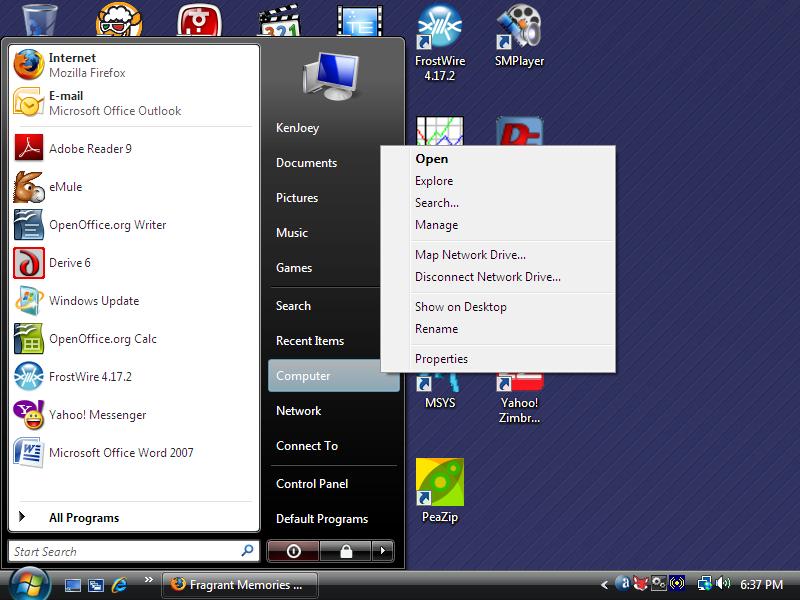
Once your PC restarts, open the Start menu, right-click Computer, and select Manage.


Right-click Computer and select Manage.

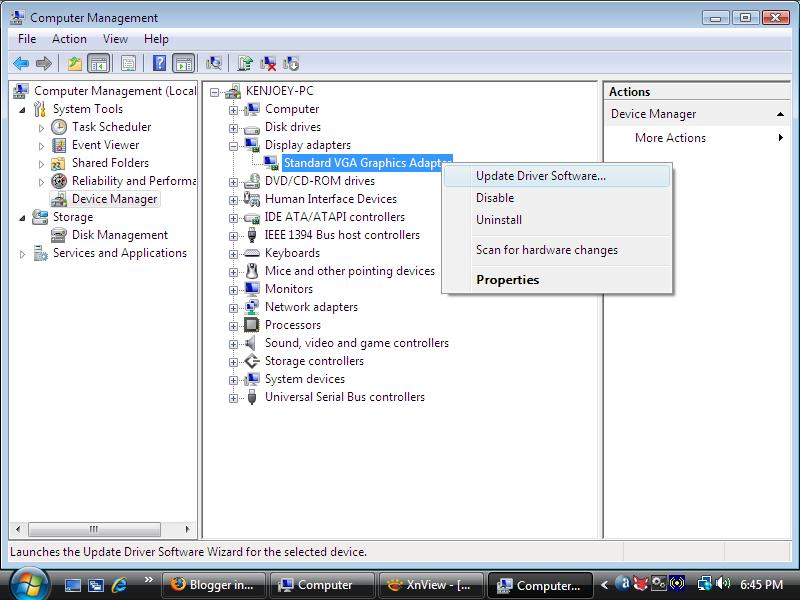
In the left pane, click Device Manager. In the right pane, expand the Display adapters section, right-click Standard VGA Graphics adapter and choose Update Driver Software.


Right-click Standard VGA Graphics adapter and choose Update Driver Software.

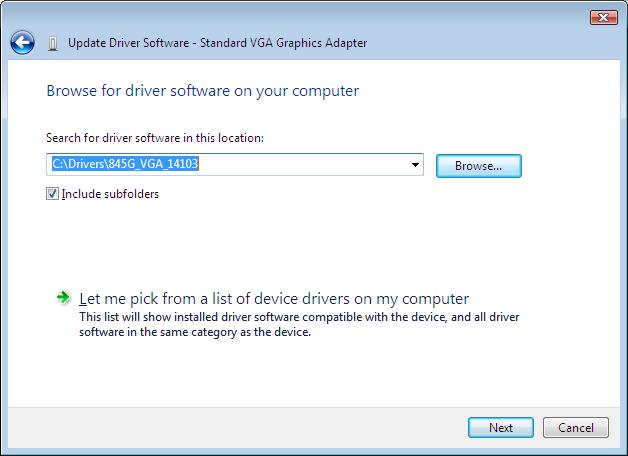
In the pop-up dialog, choose Browse My computer for driver software and indicate the folder where you unpacked the NVIDIA graphics driver. You'll get a warning that Windows can't verify the publisher of the driver. Just ignore the warning and go ahead with the installation. You may have to restart the PC again.


Go ahead with Vista driver installation

Voila, your NVIDIA RIVA TNT2 M64 video card may be a bit old but it still works OK with Windows Vista!

Saturday, January 3, 2009

Intel 845G Driver for Windows Vista

I salvaged an eMachine T1742 from an e-cycling dump. Someone had pried out the memory and hard drive from the unit. So I had to plug in new ones to set up a new PC. Then, I installed Windows Vista Home Premium Lite CD.

Windows Vista didn't recognize Intel 845G/845GL graphics chipset, so installed the driver for generic Standard VGA Graphics Adapter instead. After searching the Internet, I found the driver for Intel 845G/845GL graphics that can be used with Windows Vista. Just go to the Intel website and download the latest driver for Intel 82845G Graphics Controller. This chipset is outdated and in the archived drivers section. Get the Windows XP Professional driver for Intel 82845G Graphics controller.

Download the ZIP file (win2k_xp14103.zip) instead of the .EXE installer. Unpack it somewhere on your computer. Open the Start menu, right-click Computer, and select Manage.


Right-click Computer and select Manage.

In the left pane, click Device Manager. In the right pane, expand the Display adapters section, right-click Standard VGA Graphics adapter, and choose Update Driver Software.


Right-click Standard VGA Graphics adapter and choose Update Driver Software.

In the pop-up dialog, choose Browse My computer for driver software, and indicate the folder where you unpacked the Intel 82845G graphics driver.


Specify the folder where you put Intel 82845G driver.

If you get a warning that the driver is not digitally signed or authentic, just ignore the warning and go on with the installation. You may have to restart the PC.

One caveat with the driver is that the display may appear too bright at each boot time. Just adjust the Gamma, brightness and contrast settings in the Intel 845G control panel.

About This Blog

KBlog logo This blog seeks to share useful information on hottest movies available on the Internet. Thanks for visiting the blog and posting your comments.

© Contents by KBlog

© Blogger template by Emporium Digital 2008

Followers

Total Pageviews

icon
Powered By Blogger